
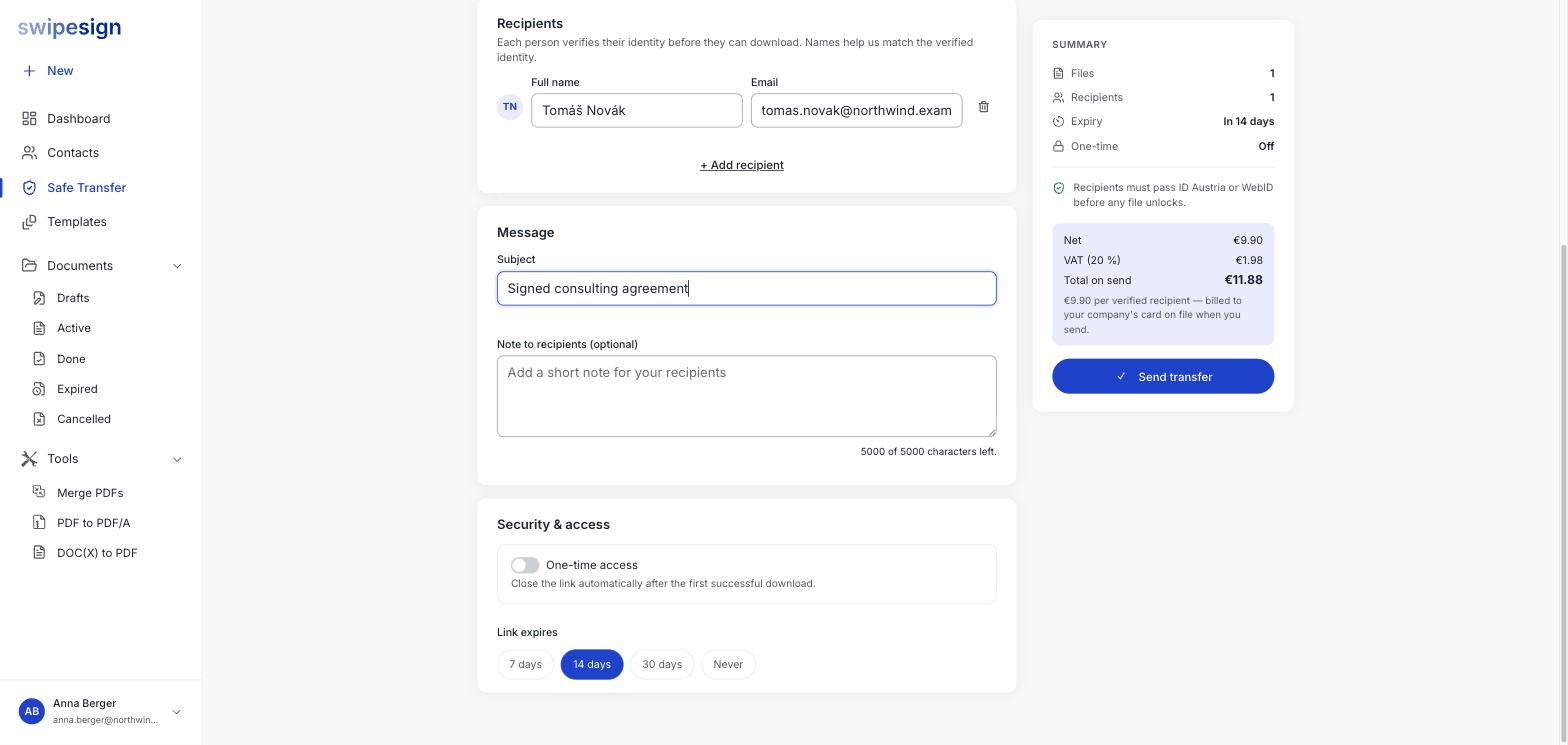
Security & access at the bottom of the compose screen has two settings. They work independently: whichever condition is met first closes the link.
Link expires
Four choices: 7 days, 14 days (the default), 30 days, or Never. Unlike a signature workflow you cannot pick an arbitrary date.
Shorter is better where you can manage it. A link nobody can use any more is one fewer thing to worry about, and the recipient's download is the only thing you actually need to happen.
One-time access
Off by default. Turn it on and the link closes automatically after the first successful download, and the transfer moves to Consumed.
It is the tighter of the two controls: the file is reachable for exactly as long as it takes the right person to take it once, regardless of the expiry date.
Which to use
| Situation | Setting |
|---|---|
| Sensitive, one known recipient | One-time on, 7 days |
| A pack several people need to work from | One-time off, 14 or 30 days |
| Something a counterparty may need to re-download later | One-time off, 30 days |
| You genuinely cannot predict | One-time off, Never: then revoke when done |
Either way you can close a transfer early. See Revoke a transfer.