
A signature you can only verify inside the tool that made it is not worth much. swipesign writes signatures into the PDF using the open PAdES standard, which means anyone can check one with software we have nothing to do with.
Learn this before you need it. If a counterparty ever questions a document, the answer is a thirty-second check they can run themselves.
The check
- 1Open the signed PDF in Adobe Acrobat Reader. It is free, and any recent version works.
- 2Ignore the blue bar across the top. On a swipesign document it says the file "claims compliance with the PDF/A standard and has been opened read-only": that is about the archival format, not the signature. Leave it read-only; Enable Editing would break the signature.
- 3Open the Signatures panel on the right. That is where validity actually lives: one entry per signer, each marked with a green tick if it checked out.
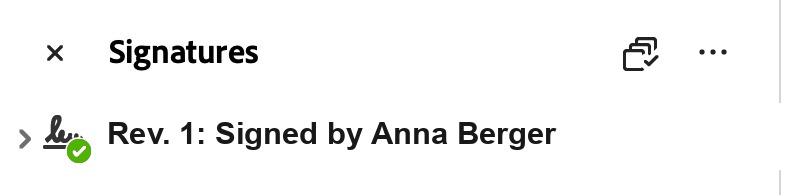
The green tick is the answer. No tick, or a yellow warning, means read on. - 4Expand the entry with the arrow beside it for the detail: the timestamp, and the certificate behind the signature.
- 5Click a signature, then Signature Properties → Show Signer's Certificate to see who issued it and to whom.
Reading the three possible answers
| What the panel shows | What it means |
|---|---|
| A green tick on every signature | The document has not changed since signing and every certificate checked out. This is the normal result. |
| A yellow warning triangle: "validity is unknown" | Adobe could verify the maths but does not recognise the issuing authority. Almost always a trust-store setting, not a problem with the document: see below. |
| A red cross: at least one signature is invalid | The file has been altered since it was signed. Go back to the original you were sent rather than the copy you are holding. |
"Validity unknown" is usually Adobe, not the document
Adobe ships with its own list of authorities it trusts. European qualified trust service providers are on the EU Trusted List, which is not the same list, so a perfectly good qualified signature can show as unknown until Adobe is told to consult it.
In Acrobat this lives under Preferences → Signatures → Verification, where you can enable validation using the European Union Trusted Lists. After that, the same document verifies cleanly.
The other two things in the file
Alongside the cryptographic signature, a completed swipesign document carries a signature certificate page, a human-readable list of who signed, appended to the document, and travels with an audit trail recording who opened, viewed and signed it, and when.
The certificate page is the version you can hand to somebody. The cryptographic signature is the version that proves it. See The audit trail.
It will still verify years from now
Everything a reader needs: the certificate chain, proof the certificate was good at the time, and a qualified timestamp: is embedded in the file at signing. No internet connection and no swipesign account required. See Why your signature stays valid for decades.
Can I use something other than Adobe?
Yes. Any PAdES-aware reader works, and the EU runs a free online validation service for qualified signatures. Adobe is simply the one most people already have.
The signature broke after I saved the file. What happened?
Re-saving, flattening or converting a signed PDF rewrites the bytes, and the signature is bound to the exact bytes. That is the seal doing its job. Go back to the original file you were sent.
My document has no visible signature on the page.
A signature does not need a visible field: where it appears is a layout choice made by the sender. Check the Signature Panel, and the certificate page at the end of the document.